The purpose of this Linux Test Tools Table is to provide the open-source community with a comprehensive list of tools commonly used for testing the various components of Linux.
http://ltp.sourceforge.net/tooltable.php
terça-feira, agosto 22, 2006

domingo, agosto 06, 2006
sábado, agosto 05, 2006
Comparison of Linux distributions
The many available Linux distributions differ for a range of reasons including technical, organizational, and philosophical.
Technical variations include support for different hardware devices and systems or software package configurations. Organizational differences may be motivated by technical decisions but also by philosophical or even historical reasons. Some distributions specialise in use on desktops, servers or routers. Other criteria include security, including how quickly security upgrades are available; ease of package management; and number of binary packages available.
These tables compare the latest stable release of major distributions on a range of objective criteria. It does not cover the subjective merits of each operating system, branches marked as unstable/beta, nor compare Linux distributions with other operating systems.
Look at: http://en.wikipedia.org/wiki/Comparison_of_Linux_distributions
sexta-feira, agosto 04, 2006
Warsaw's Laws of Hackering
In the great tradition of Murphy's Law and other related laws, I offer my humble few. I'm not sure I have rightful claim to originating all these, so if you find a previous reference to these laws, please let me know!
Warsaw's First Law: The Rule of Estimate Accuracy Insurance
When making a time estimate for any programming task, make your best formalized guess, then multiply by two and bump it up a unit. E.g. "I think it will take me three days to hack in those changes to the frobnicator"; My official estimate: 6 weeks.
Warsaw's Second Law: Unbending Law of Commit Scheduling
Never change anything after 3pm on a Friday.
Corollary to Warsaw's Second Law
If you do change anything after 3pm on Friday, you will break it, and thus end up fixing it for the entire weekend. You will probably not be able to sleep, and if you do fall asleep, you will dream about the breakage. On Monday morning, you will fix the problem in five minutes.
Warsaw's Third Law: Law of Software in a Vacuum
All software sucks. Make sure yours sucks less.
Warsaw's Fourth Law: The Law of Pinball Machine Instructions
It doesn't matter a wit if the instructions are printed clearly for all to see, nobody will read them. They'll just drop their quarters and start pushing buttons like a Tommy. Software is the same.
Warsaw's Fifth Law: A Rose By Any Other Name (a.k.a the Pink Floyd Rule)
All names are stupid until you become rich and famous with it.
Source: http://barry.warsaw.us/software/laws.html
segunda-feira, julho 24, 2006
YouOS - A Web Operating System
YouOS is an experiment in a new kind of computing platform.
https://www.youos.com
sábado, julho 22, 2006
The Top 20 Most Critical Internet Security Vulnerabilities
Top Vulnerabilities in Windows Systems
W1. Windows Services
W2. Internet Explorer
W3. Windows Libraries
W4. Microsoft Office and Outlook Express
W5. Windows Configuration Weaknesses
Top Vulnerabilities in Cross-Platform Applications
C1. Backup Software
C2. Anti-virus Software
C3. PHP-based Applications
C4. Database Software
C5. File Sharing Applications
C6. DNS Software
C7. Media Players
C8. Instant Messaging Applications
C9. Mozilla and Firefox Browsers
C10. Other Cross-platform Applications
Top Vulnerabilities in UNIX Systems
U1. UNIX Configuration Weaknesses
U2. Mac OS X
Top Vulnerabilities in Networking Products
N1. Cisco IOS and non-IOS Products
N2. Juniper, CheckPoint and Symantec Products
N3. Cisco Devices Configuration Weaknesses
Source: http://www.sans.org/top20
terça-feira, julho 18, 2006
Server monitoring
To make all sorts of graphs:
apt-get install munin munin-node
Example: http://munin.ping.uio.no
To compute more statistics:
* anteater
* isoqlog
* mailgraph
Monitor system logs: logcheck:
* sends you mail with abnormal log lines
* It's important to customize what is normal and you do it with regular expressions
Source: http://www.enricozini.org/blog/eng/seventh-day-in-addis.html
Games for Linux
http://forums.gentoo.org/viewtopic-t-429035-postdays-0-postorder-asc-highlight-monsterz-start-0.html
segunda-feira, julho 17, 2006
Phoronix Linux Compatible Hardware
Phoronix LCH is designed to be a community-driven indexing system for computer hardware under GNU/Linux. This system allows you to post GNU/Linux information on hardware as well as sharing your own personal experiences when it comes to GNU/Linux compatibility. You are also able to browse and search the database for other hardware as well. This is designed to make it much more effortless when deciding what GNU/Linux compatible hardware to go with during your next upgrade. Phoronix LCH is not distribution specific, and allows comments from all versions of GNU/Linux. Phoronix LCH is to spread what works and what doesn't when it comes to hardware under Linux.
http://www.phoronix.com/lch
sábado, julho 15, 2006
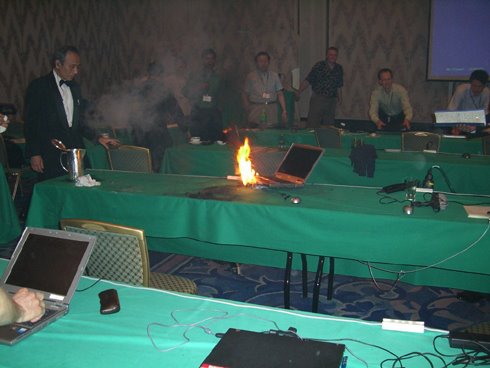
Dell laptop explodes at Japanese conference
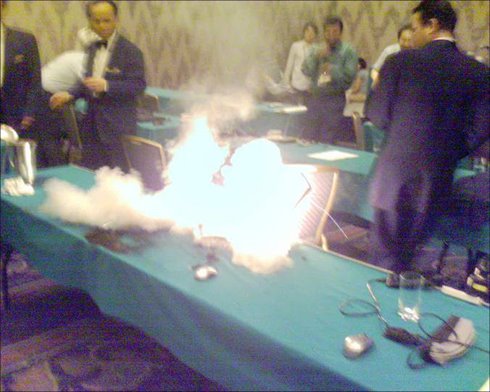
A laptop reported to be a Dell burst into flame and was caught on camera during a recent Japanese conference. Guess this laptop could be a poster child to prove that laptops really can cause sterility if they are on your lap. :-)
Fully Open Source NTFS Support Under Linux
The Linux NTFS project has released a beta version of its fully open source userspace (using FUSE) 3G-Linux NTFS support driver. According to the developer, this driver beats hands down other NTFS support solutions performance-wise (including commercial Paragon NTFS driver and also Captive NTFS, which is using windows ntfs.sys driver under WINE).
http://www.linux-ntfs.org
terça-feira, julho 04, 2006
The Ten Most Critical Wireless and Mobile Security Vulnerabilities
1. Default WiFi routers: By default, wireless routers are shipped in an un-secured state.
2. Rogue Access Points: set up an authorized access point, without informing the network administrator.
3. Wireless Zero Configuration: When a computer connects to an access point, it generally stores the details of that connection locally. The next time the computer is turned on, the wireless network card immediately looks for the connection and re-establishes the connection. Since the SSID value is sent as plain text, anyone with a sniffer can see it. Programs like Karma automate this process.
4. Bluetooth exploits: BlueSnarfing, BlueBugging, BlueJacking, BlueTooth DoS attacks.
5. WEP Weaknesses: passwords can easily be cracked using Airsnort.
6. Clear Text Encryption Passwords: Some of the most popular mobile encryption programs even store the password in plain text in the registry.
7. Malicious Code: "Airborne" mobile viruses.
8. Autorun: Windows Mobile devices contain a little-known autorun feature that can provide an attacker with a quick and easy method of infection. When a media card is inserted into the PDA, Windows Mobile will copy over the autorun.exe (if it exists), create a copy in the /Windows directory, and execute it. A user can prevent this by creating a read-only dummy executable called autorun.exe and put it in the /Windows folder.
9. Multiple VoIP attacks: VoIP is mostly sent in an unencrypted format. As a result, anyone can see the connection information and capture/record the conversation. Programs like VoMiT and Cain & Abel can easily capture and record conversations. Other programs like sipbomber can kick a user offline. In addition, SiVus (a VoIP scanner) can quickly locate VoIP enabled systems.
10. Lost and stolen devices: All mobile databases should be encrypted. A good, written security policy and user education are also important. Mobile devices should all have a login copyright banner, along with return information.
Fonte: Help Net Security ( http://www.net-security.org/article.php?id=927&p=1 )
segunda-feira, julho 03, 2006
Partimage
Partition Image is a Linux/UNIX utility which saves partitions in many formats (see below) to an image file. The image file can be compressed in the GZIP/BZIP2 formats to save disk space, and split into multiple files to be copied on removable floppies (ZIP for example), ... Partitions can be saved across the network since version 0.6.0.
http://www.partimage.org
segunda-feira, junho 26, 2006
nUbuntu

The main goal of nUbuntu is to create a distribution which is derived from the Ubuntu distribution, and add packages related to security testing, and remove unneeded packages, such as Gnome, Openoffice.org, and Evolution. nUbuntu is the result of an idea two people had to create a new distribution for the learning experience. Many people ask, "What makes it better than X?", or "Why should I use this over Y". Our answer to this question is, we do not think about whether people are using it or not. We are more concerned about the learning process. If you want to try something with a clean interface, fast, and an excellent range of programs please don't hesitate to download nUbuntu.
http://www.nubuntu.org
domingo, junho 25, 2006
Top 100 Network Security Tools
After the tremendously successful 2000 and 2003 security tools surveys, Insecure.Org is delighted to release this 2006 survey. Fyodor asked users from the nmap-hackers mailing list to share their favorite tools, and 3,243 people responded. This allowed me to expand the list to 100 tools, and even subdivide them into categories. Anyone in the security field would be well advised to go over the list and investigate tools they are unfamiliar with.
http://sectools.org
domingo, junho 18, 2006
Sistemas Operacionais na Copa 2006
FIFA World Cup - FreeBSD
Yahoo! - FreeBSD
Phillips - FreeBSD
Toshiba - Solaris 9 / FreeBSD
McDonalds - Solaris 8 / FreeBSD
Coca-Cola Company - Linux / IBM Appliances
Adidas - Linux / Windows 2003
Budweiser - Windows 2000
Avaya - Solaris 8 / Windows 200 / FreeBSD
Continental - Linux / IBM
Deutsche Telekom - Solaris 8 / FreeBSD
Fly Emirates - Windows 2003
Fuji Film - Solaris 8
Gillette - Windows 2000
Mastercard - Solaris 8 / FreeBSD / Windows 2000
Fonte: FUG-BR ( http://www.fug.com.br/content/view/64/54 )
quinta-feira, junho 15, 2006
Red Hat Knowledgebase
Red Hat Knowledgebase is a library of tips, troubleshooting advice, and current information updated daily by Red Hat technicians.
http://kbase.redhat.com
quarta-feira, junho 07, 2006
Ubuntu Weekly Newsletter
Ubuntu Weekly Newsletter - Reporting all of this weeks Ubuntu, Kubuntu, Edubuntu and Xubuntu action.
https://wiki.ubuntu.com/UbuntuWeeklyNewsletter
terça-feira, junho 06, 2006
DSPAM
DSPAM is one of the web's premiere anti-spam solutions, written by Jonathan Zdziarski. These pages are devoted to explaining how to install and use DSPAM.
http://dspamwiki.expass.de
domingo, junho 04, 2006
Automatix for Dapper and Breezy
http://www.ubuntuforums.org/showthread.php?t=177646
Items for specifically Breezy or Dapper will have a BR-Breezy, DP-Dapper or BD for both.
Capabilities:
1) Installs multimedia codecs - BD
2) Installs all Firefox plugins (java, flash, etc) (except Adobe reader and mplayer) - BD
3) Installs RAR, ACE and UNRAR archive support - BD
4) Installs skype - BD
5) Installs Acrobat reader 7 and firefox plugin for the same. - BD
6) Installs Gnomebaker (CD/DVD burning s/w for GNOME) - BD
7) Installs gftp (FTP client for GNOME with ssh capability) - BD
8) Installs Frostwire (GPL clone of Limewire) - BD
9) Installs multimedia editors (Audacity (audio), Kino (video), EasyTag (ID3)) - BD
10) Installs DVD (dvdrip) ripper - BD
11) Installs Mplayer and mplayerplug for Firefox - BD
12) Installs totem-xine, Realplayer, VLC and Beep Media Player (with docklet) - BD
13) Installs Opera Browser - BD
14) Installs Debian Menu (shows all installed applications) (this kills and restarts your gnome-panel without warning u but its a completely harmless operation!) - BD
15) Installs Bittornado and Azureus (Bittorrent clients) - BD
16) Installs Avidemux (Video editing tool) (New version 2.1.0) - BD
17) Enables Numlock on (turns numlock on Gnome startup) - BD
18) Installs Programming Tools (Anjuta (C/C++ IDE), Bluefish (HTML editor), Screem (Web Development Env.) and NVU (HTML editor)) - BD
19) Install GnomePPP (Graphical Dial up connection tool) - BD
20) Installs MS true type fonts - BD
21) Configures ctrl-alt-del to start gnome-system-monitor (aka windows) - BD
22) Installs Streamripper and Streamtuner - BD
23) Installs NON-FREE audio and dvd codecs - BD
24) Installs ndisgtk (WiFi configurator Graphical user interface) - BD
25) Upgrades Open Office to 2.0 (final version), installs openoffice clipart and installs OO2 thumbnailer. - BR
26) Adds 3 nautilus scripts (open any file with gedit as root; open a nautilus window as root in any folder; open gnome search tool in any folder (Right click in a nautilus window and look under "scripts") - BD
27) Installs SUN'S JAVA JRE version 1.5 - BD
28) Installs SUN'S JAVA JDK version 1.5 - BD
29) Installs wine (u need to run winecfg manually after installation) - BD
30) Enables ejection of CD when CDROM drive button is pressed. - BD
31) Installs AMSN 0.95 (MSN client with webcam support) - BD
32) Installs Mercury Messenger (Java based MSN client with webcam support) - BR
33) Installs BUM (Boot-up Manager) - BD
34) Installs DCPP (Linux DC++ client) - BD
35) Installs sbackup (Backup and restoration solution) - BD
36) Installs the latest version of Rhythmbox - DP
37*) Installs firestarter (GNOME firewall frontend) and adds firestarter to GNOME startup - BR
38*) installs gdesklets (GNOME eyecandy) and adds gdesklets to GNOME startup - BD
39*) Gamepads (Makes USB gamepads work) - BR
40*) Turns DMA ON on Intel and AMD machines (needs a restart) - BR
41*) NVIDIA cards (Detects Nvidia cards and installs drivers) (Needs a restart) - BD
42*) Adds midi capability to your Ubuntu box (test by playing a midi file with timidity or pmidi from terminal) - BR
43*) Installs Firefox 1.5.0.3 and its plugins(themes and extensions are not retained.bookmarks need to be copied from backup folder) - BR
44*) Installs Mozilla-Thunderbird 1.5 (US-only version) (no support for non-US-english language packs and enigmail) - BD
45*) Fixes Gnome sound related issues (ALSA and ESD config) (needs a restart) (ONLY FOR GNOME! NOT TO BE USED ON KDE/XFCE) - BR
Assinar:
Postagens (Atom)


 Postagens


