sexta-feira, novembro 24, 2006

Security Configuration Guides

NSA initiatives in enhancing software security cover both proprietary and open source software, and we have successfully used both proprietary and open source models in our research activities. NSA's work to enhance the security of software is motivated by one simple consideration: use our resources as efficiently as possible to give NSA's customers the best possible security options in the most widely employed products. The objective of the NSA research program is to develop technologic advances that can be shared with the software development community through a variety of transfer mechanisms. NSA does not favor or promote any specific software product or business model. Rather, NSA is promoting enhanced security.

http://www.nsa.gov/snac/index.cfm?MenuID=scg10.3.1

domingo, novembro 05, 2006

Linux Kernel Swear Counts

http://www.vidarholen.net/contents/wordcount

http://durak.org/sean/pubs/kfc

sábado, novembro 04, 2006

No More Ads in your Firefox!

Get this plugins:

Adblock:
https://addons.mozilla.org/firefox/1865

FlashBlock:
https://addons.mozilla.org/firefox/433

segunda-feira, outubro 30, 2006

Arudius

Arudius is an information assurance (IA) Linux live CD with tools for penetration testing and vulnerability analysis. IA has many other aspects besides network security. However, it seems that the mainstream public identifies informaion assurance primarily with securing network-enabled systems, so we decided to go with the mainstream and call Arudius a tool for information assurance. The CD consists of a Zenwalk Linux base on top of which a large collection of network security testing software (full list) has been installed - including tools listed on Insecure.org Top 75 list plus many other tools listed on Freshmeat, Sf.net and other information assurance sites around the world.

http://arudius.sourceforge.net

Linux Podcasts

http://www.thelinuxlink.net

segunda-feira, outubro 23, 2006

Virtual Serial Port Driver

A virtual serial port is a trade term used by certain vendors of COM port redirector software that emulates a serial port (RS-232, RS-422, and RS-485). This port is created by special software products which enable extra serial ports in operation system without additional hardware installation (such as expansion cards, etc.). Unlike the standard physical serial port the virtual one can be assigned any name (COM255, VSP33, etc.) to. It is possible to create unlimited number of virtual serial ports in your PC. The only limitation is the performance capacity of your system, as it may require a substantial amount of resources to emulate say 255 serial ports on slow computers.

Virtual serial port emulates all serial port functionality, including Baud rate, Data bits, Parity bits, Stop bits, etc. Additionally it allows controlling the data flow, emulating all signal lines (DTR/DSR/CTS/RTS/DCD/RI) and customizing pinout (only advanced solutions).

Serial ports emulation can be useful in case there is a lack of available physical serial ports or they do not meet the current requirements. For instance, virtual serial ports can help you share data between several applications from one GPS device connected to serial port. Another option is to communicate with any other serial devices via internet or LAN as if they are locally connected to computer (Serial-over-Ethernet technology). You can establish connection between two computers or applications via emulated null-modem link. Most of the available virtual serial port emulators are compatible with Windows 9x, Windows NT, Windows 2000, Windows ME, Windows 2003, Windows XP and some of them run under Windows CE, Windows Mobile and Pocket PC.

Virtual serial ports are available as both commercial products and free software.

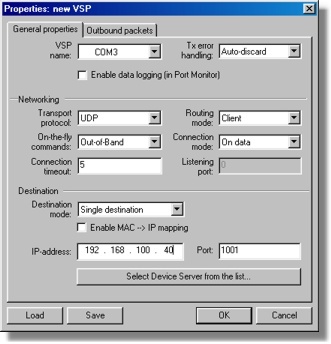
Virtual Serial Port Driver (VSPD) turns serial ports of Tibbo Device Servers into remote COM ports of your PC. VSP Manager is used to create and manage Virtual Serial Ports (VSPs).


http://www.tibbo.com/vspdl.php

w3bfukk0r - scan webservers for hidden directories (forced browsing)

w3bfukk0r is a forced browsing tool, it basically scans webservers (HTTP/HTTPS) for a directory by using HTTP HEAD command and brute force mechanism based on a word list. Features:

* HTTP/HTTPS(SSL) support
* Banner grabbing
* User-Agent faking
* Proxy support (HTTP/S)
* Reports found and non-existend directories

http://www.ngolde.de/w3bfukk0r.html

Medusa Parallel Network Login Auditor

Medusa is intended to be a speedy, massively parallel, modular, login brute-forcer. The goal is to support as many services which allow remote authentication as possible. The author considers following items as some of the key features of this application:

* Thread-based parallel testing. Brute-force testing can be performed against multiple hosts, users or passwords concurrently.
* Flexible user input. Target information (host/user/password) can be specified in a variety of ways. For example, each item can be either a single entry or a file containing multiple entries. Additionally, a combination file format allows the user to refine their target listing.
* Modular design. Each service module exists as an independent .mod file. This means that no modifications are necessary to the core application in order to extend the supported list of services for brute-forcing.

http://www.foofus.net/jmk/medusa/medusa.html

sábado, outubro 07, 2006

Beryl

Beryl is a combined window manager and compositing manager that runs on top of Xgl or AIGLX using OpenGL to provide effects accelerated by a 3D graphics card on the desktop.


What is the difference between freedesktop.org compiz and beryl?

* Uses flat file backend instead of gconf meaning almost no gnome dependency.
* Needs "beryl-settings", an application to configure settings instead of gconf-editor.
* Has a lot of extra plugins and enhanced features in other plugins.
* Starts with beryl-manager.
* Has a themeable decorator (emerald).
* Has a theme manager (emerald-themer).
* Changes frequently: new features are added on a daily basis.
* Made by a community right here at forum.beryl-project.org, although submissions of extra plugins and enhancements from here to freedesktop would make the compiz better over all.

http://wiki.beryl-project.org/index.php/Main_Page

http://forum.beryl-project.org/

segunda-feira, outubro 02, 2006

Computer Power Supply Calculator

http://www.extreme.outervision.com/psucalculator.jsp

domingo, outubro 01, 2006

Linux Sysadmin Tools

http://librenix.com/?inode=8054

segunda-feira, setembro 11, 2006

Spamer was condemned in Virginia

The Court of Appeals of Virginia upheld yesterday what is believed to be the first conviction in the nation under a state anti-spamming law that makes it a felony to send unsolicited mass e-mails.

A North Carolina man was convicted in Loudoun County two years ago of illegally sending tens of thousands of e-mails to America Online customers. Prosecutors said Jeremy Jaynes flooded the servers at the Internet company's headquarters in Loudoun with bulk e-mail advertisements for computer programs and stock pickers.

Jaynes was sentenced last year to nine years in prison on three counts of violating the state's anti-spam law and was allowed to remain free on $1 million bond while his case was appealed. Thomas M. Wolf, an attorney for Jaynes, said he plans to appeal yesterday's decision.

source: http://www.washingtonpost.com/wp-dyn/content/article/2006/09/05/AR2006090501166.html
and http://it.slashdot.org/article.pl?sid=06/09/08/1237230

domingo, setembro 10, 2006

Splitting Large Files to Span Multiple Disks using TAR

The two extra command line options you need to use over and above the standard syntax are -M (--multi-volume) which tells Tar you want to split the file over multiple media disks. You then need to tell Tar how big that media is, so that it can create files of the correct size. To do this you use the --tape-length option, where the value you pass is number x 1024 bytes.

The example below shows the syntax used. Lets say the largefile.tgz is 150 Meg and we need to fit the file on two 100 Meg Zip drives.

tar -c -M --tape-length=102400 --file=disk1.tar largefile.tgz

The value 102400 is 1024 x 100, which will create a 100 Meg file called disk1.tar and then Tar will prompt for volume 2 like below :-

Prepare volume #2 for disk1.tar and hit return:

In the time of tape drives you would have taken the first tape out of the machine and inserted a new tape, and pressed returned to continue. As we want Tar to create the remaining 50 Meg in a separate file, we issue the following command :-

n disk2.tar

This instructs Tar to continue writing the remaining 50 Meg of largefile.tgz to a file named disk2.tar. You will then be prompted with the line below, and you can now hit return to continue.

Prepare volume #2 for disk2.tar and hit return:

You would repeat this process until your large file has been completely processed, increasing the disk number in the file each time you are prompted.

Other example:
tar cvf arq1.tar -M --tape-length=500000 bigarq.txt


Putting the File Back Together

The process is similar when putting the large file back together from its split-up files. Below is the syntax used to re-create the large file from the disk1.tar and disk2.tar images.

C:\tar>tar -x -M --file=disk1.tar largefile.tgz
Prepare volume #2 for disk1.tar and hit return: n disk2.tar
Prepare volume #2 for disk2.tar and hit return:


Source: http://www.cgi-interactive-uk.com/splitting_large_files.html

sexta-feira, setembro 08, 2006

SMTP reply codes

500 Syntax error, command unrecognized [This may include errors such as command line too long]
501 Syntax error in parameters or arguments
502 Command not implemented
503 Bad sequence of commands
504 Command parameter not implemented

211 System status, or system help reply
214 Help message [Information on how to use the receiver or the meaning of a particular on-standard command; this reply is useful only to the human user]

220 Service ready
221 Service closing transmission channel
421 Service not available, closing transmission channel [This may be a reply to any command if the service knows it must shut down]

250 Requested mail action okay, completed
251 User not local; will forward to
450 Requested mail action not taken: mailbox unavailable [E.g., mailbox busy]
550 Requested action not taken: mailbox unavailable [E.g., mailbox not found, no access]
451 Requested action aborted: error in processing
551 User not local; please try
452 Requested action not taken: insufficient system storage
552 Requested mail action aborted: exceeded storage allocation
553 Requested action not taken: mailbox name not allowed [E.g., mailbox syntax incorrect]
354 Start mail input; end with .
554 Transaction failed

Source: RFC 821

quarta-feira, setembro 06, 2006

Debian Installers

http://linuxmafia.com/faq/Debian/installers.html

Convert CUE/BIN images to ISO in Linux

It's simple:

bchunk image.bin image.cue image.iso

Then you can mount ISO image with "mount" command:

mount -o loop -t iso9660 image.iso /mnt

terça-feira, agosto 22, 2006

Linux Test Tools

The purpose of this Linux Test Tools Table is to provide the open-source community with a comprehensive list of tools commonly used for testing the various components of Linux.

http://ltp.sourceforge.net/tooltable.php

domingo, agosto 06, 2006

Linux Command line Tips

http://www.pixelbeat.org/cmdline.html

sábado, agosto 05, 2006

Comparison of Linux distributions

The many available Linux distributions differ for a range of reasons including technical, organizational, and philosophical.

Technical variations include support for different hardware devices and systems or software package configurations. Organizational differences may be motivated by technical decisions but also by philosophical or even historical reasons. Some distributions specialise in use on desktops, servers or routers. Other criteria include security, including how quickly security upgrades are available; ease of package management; and number of binary packages available.

These tables compare the latest stable release of major distributions on a range of objective criteria. It does not cover the subjective merits of each operating system, branches marked as unstable/beta, nor compare Linux distributions with other operating systems.

Look at: http://en.wikipedia.org/wiki/Comparison_of_Linux_distributions

sexta-feira, agosto 04, 2006

Warsaw's Laws of Hackering

In the great tradition of Murphy's Law and other related laws, I offer my humble few. I'm not sure I have rightful claim to originating all these, so if you find a previous reference to these laws, please let me know!

Warsaw's First Law: The Rule of Estimate Accuracy Insurance
When making a time estimate for any programming task, make your best formalized guess, then multiply by two and bump it up a unit. E.g. "I think it will take me three days to hack in those changes to the frobnicator"; My official estimate: 6 weeks.

Warsaw's Second Law: Unbending Law of Commit Scheduling
Never change anything after 3pm on a Friday.

Corollary to Warsaw's Second Law
If you do change anything after 3pm on Friday, you will break it, and thus end up fixing it for the entire weekend. You will probably not be able to sleep, and if you do fall asleep, you will dream about the breakage. On Monday morning, you will fix the problem in five minutes.

Warsaw's Third Law: Law of Software in a Vacuum
All software sucks. Make sure yours sucks less.

Warsaw's Fourth Law: The Law of Pinball Machine Instructions
It doesn't matter a wit if the instructions are printed clearly for all to see, nobody will read them. They'll just drop their quarters and start pushing buttons like a Tommy. Software is the same.

Warsaw's Fifth Law: A Rose By Any Other Name (a.k.a the Pink Floyd Rule)
All names are stupid until you become rich and famous with it.


Source: http://barry.warsaw.us/software/laws.html